
Calendar Settings
Click the settings icon in the toolbar to open calendar settings.
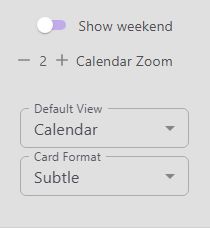
Show Weekend
Toggle this setting to show or hide Saturday and Sunday columns on the calendar grid.
Calendar Zoom
Use the plus and minus buttons to adjust the row height of the calendar grid. The zoom scale ranges from 1 to 10. A higher value makes each hour taller, giving you more room for entries in busy time slots.
Default View
Choose whether the time tracker opens in Calendar or List view by default.
Card Format
Choose how entry cards appear on the calendar grid. The available formats are:
Basic — Shows the project, category, description, tags, and duration.
Dot — A minimal view with a color dot indicator.
Subtle — Shows the category, description, tags, and duration.
Full — Displays all entry details.
Header — A compact header-style layout.